Environment Setup
Connection Settings
| Setting | Value | Description |
|---|---|---|
| Protocol | HTTP | |
| Host | Gateway IP address | Use the gateway's LAN address, returned by gateway discovery. 127.0.0.1 refers to your own machine. |
| Port | 8080 | |
| Base path | / |
Authentication Settings
Authenticate requests by sending your gateway credential in the application-key header.
| Setting | Value | Description |
|---|---|---|
| Authentication type | API Key | Obtain a credential by registering your application. |
| Add to | Header | Include the credential in every authenticated request. |
| Key | application-key | The HTTP header name. |
| Value | Registration credential | Use the value returned as data.obj.username. See Authentication for details. |
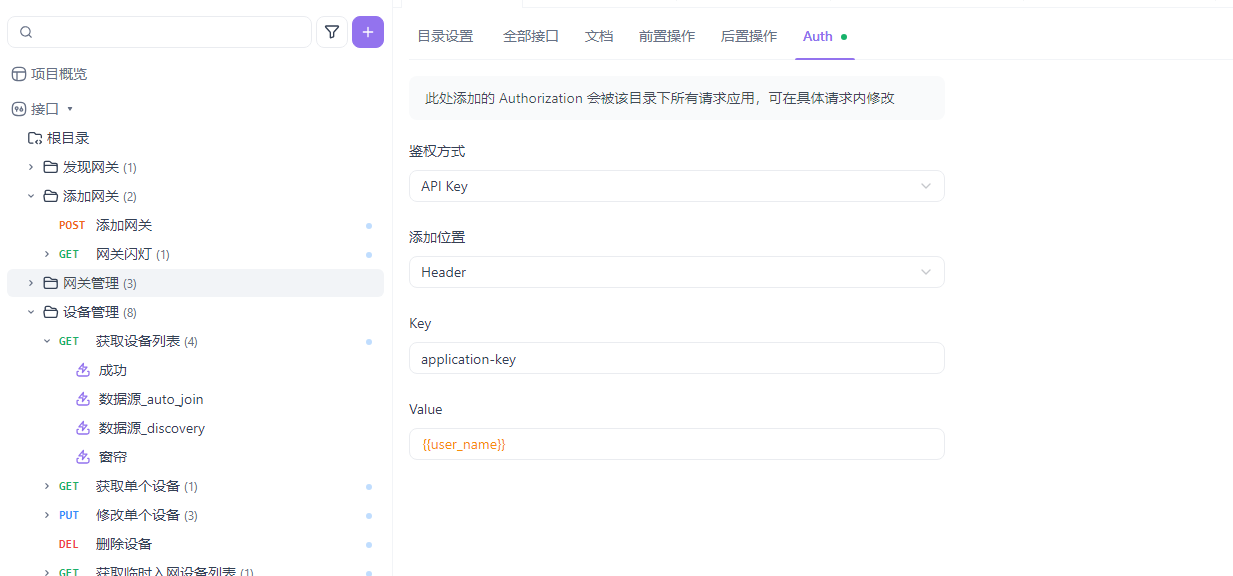
Configure Authentication in Apifox
- Open the request's Auth settings.
- Select API Key as the authentication type.
- Set Key to
application-keyand Value to the credential returned by the gateway. - Set Add to to Header.
The screenshot shows the Chinese version of Apifox; use the settings above if your interface is in English.